The Death of the Static Product Title in AI Max Shopping
Google's AI Max for Shopping brings generative product titles and a dedicated report. Why the static feed era is ending, how this echoes SA360 inventory management, and the guardrails needed before turning it on.


For the past decade, every ecommerce search campaign I built followed one universal law: the feed is destiny.
Over the last ten years in performance marketing, I have spent an unreasonable amount of time obsessing over product title formulas. In my client accounts, my team and I tested every conceivable variation across Feedonomics, Channable, and Google Merchant Centre (GMC) supplemental feeds. We tested [Brand] + [Product Type] + [Colour] + [Size] against [Product Type] + [Key Attribute] + [Brand] + [SKU]. We treated the first seventy characters of a product title as the most valuable real estate in performance marketing, because in standard Google Shopping, it was.
That era of static feed dominance is coming to an end.
With the rollout of AI Max for Shopping campaigns (beta) and the arrival of a dedicated Product titles report in Google Ads, Google is fundamentally dismantling the traditional relationship between product feeds and search auctions. Google AI is no longer treating your GMC feed as a static catalogue to be displayed as uploaded. Instead, it is treating your feed as an unstructured attribute database, synthesising bespoke, query-matched product titles in real time at the exact millisecond an auction takes place.
If this feels familiar, it should. Four to five years ago, I was building complex Inventory Management setups in Search Ads 360 (SA360) and DoubleClick Search: pulling live stock levels, dynamic price points, and custom product attributes from feeds to construct contextual ad copy and category-level text ads. We wanted Google to do this natively at query time years ago.
Now, with generative multimodal AI baked directly into the ad engine, Google has made that capability universal. But with that power comes significant operational risk. If you turn it on without strict guardrails, you risk hurting your brand equity, polluting your data, and diluting your margin.
Static titles were built for a search box where users typed three-word noun phrases. Generative titles are built for an AI-native search ecosystem where users ask complex, conversational, multi-attribute questions across AI Overviews and AI Mode.
What AI Max for Shopping Actually Does Under the Hood
To evaluate this feature properly, you have to look past the marketing deck and understand the underlying mechanics documented in Google's official first-party documentation.
AI Max for Shopping is not a single toggle. It is a dual-engine creative and targeting suite:
- 1. Text Customisation (Dynamic Product Titles): Extracts attributes from your GMC feed and product pages, rewrites titles dynamically at auction time to match conversational query intent, gated by Google's performance prediction models.
- 2. Final URL Expansion (Feed-Powered Text Ads): Crawls your domain for high-value category and collection pages, dynamically assembling hybrid search text ads to capture mid-funnel research queries.
1. Text Customisation (Dynamic Product Titles)
When you enable Text Customisation, Google AI combines extractive techniques (harvesting data from your Merchant Centre feed attributes and your product landing pages) with generative AI to dynamically rewrite product titles.
Google's stated algorithm follows three strict criteria before an AI title is shown:
- Grounded in merchant data: The model is constrained to facts, specs, and attributes found in your feed or crawled on the product page.
- Performance-first gating: An AI-generated title will only serve if Google's internal models predict it will yield a higher click-through rate (CTR) or conversion uplift compared to your original feed title. If no uplift is predicted, your original title serves.
- Quality filters: Output is checked against natural language guardrails to ensure readability and compliance.
Consider Google's official baseline example from their documentation:
| Original Uploaded Title | User Search Context / Intent | Dynamic AI-Generated Title Served |
|---|---|---|
Lounge deep 93" sofa | Broad aesthetic search | Lounge Deep Sofa with Soft Cushions |
Lounge deep 93" sofa | Origin / quality-driven search | Made in USA 93" Deep Sofa |
Lounge deep 93" sofa | Technical / dimensional query | `Lounge deep 93" sofa |
In a traditional setup, my static feed title could only optimise for one of these search patterns. If I prioritised dimensions, I sacrificed relevance on material or origin queries. Text Customisation eliminates that fixed-asset compromise by treating product attributes as modular Lego blocks that assemble to match the specific search intent.
2. Final URL Expansion for Shopping
Final URL Expansion expands your Shopping campaign beyond product detail pages (PDPs) into hybrid text and product formats.
Instead of routing every click exclusively to the product URL provided in your Merchant Centre feed, Google crawls your domain for high-value commercial URLs, such as product listing pages (PLPs), curated collection pages, or seasonal category hubs. It uses feed data to dynamically assemble search text ads matching broader, research-heavy searches.
(Note: In Google's architecture, Final URL expansion requires Text Customisation to be active so that generated ad copy matches the destination page).
The SA360 Parallels: Why History Is Repeating (With Smarter Engines)
Ten years ago, enterprise PPC practitioners used SA360 Inventory Management templates to generate millions of hyper-specific ad variations. We wrote rule-based templates like:
[Product:Brand] + [Product:Name] in stock. Only £[Product:Price] + Free Delivery.
It worked because it bridged the gap between static keywords and live retailer reality. But it suffered from two structural flaws:
- Brittle logic: If an attribute was missing or formatted poorly in the feed, ads broke or served nonsensical copy.
- Deterministic matching: It could not adapt to how the user actually asked the question.
AI Max for Shopping takes the core philosophy of SA360 Inventory Management and upgrades it with a large multimodal language model. Instead of relying on rigid IF/THEN templates, Google's LLM reads the user's multi-sentence prompt, understands the underlying intent, identifies the matching SKU from your feed, and generates a bespoke headline on the fly.
Inside the Product Titles Report: Breaking Open the Black Box
For years, automation in Google Ads meant loss of visibility. Smart Shopping and early Performance Max stripped out search term reports and asset-level metrics, forcing practitioners into blind trust.
The newly released Product titles report inside the AI Max beta changes that dynamic entirely (Campaigns -> Assets -> Product Titles Report).
This report surfaces:
- The Original Product Title: Exactly what exists in your Merchant Centre feed.
- The AI-Generated Product Title: The exact string synthesised and served by Google AI.
- Comparative Performance Columns: Impressions, Clicks, Cost, CTR, Conversions, Conversion Value, and ROAS split between the original and the AI-generated variants.
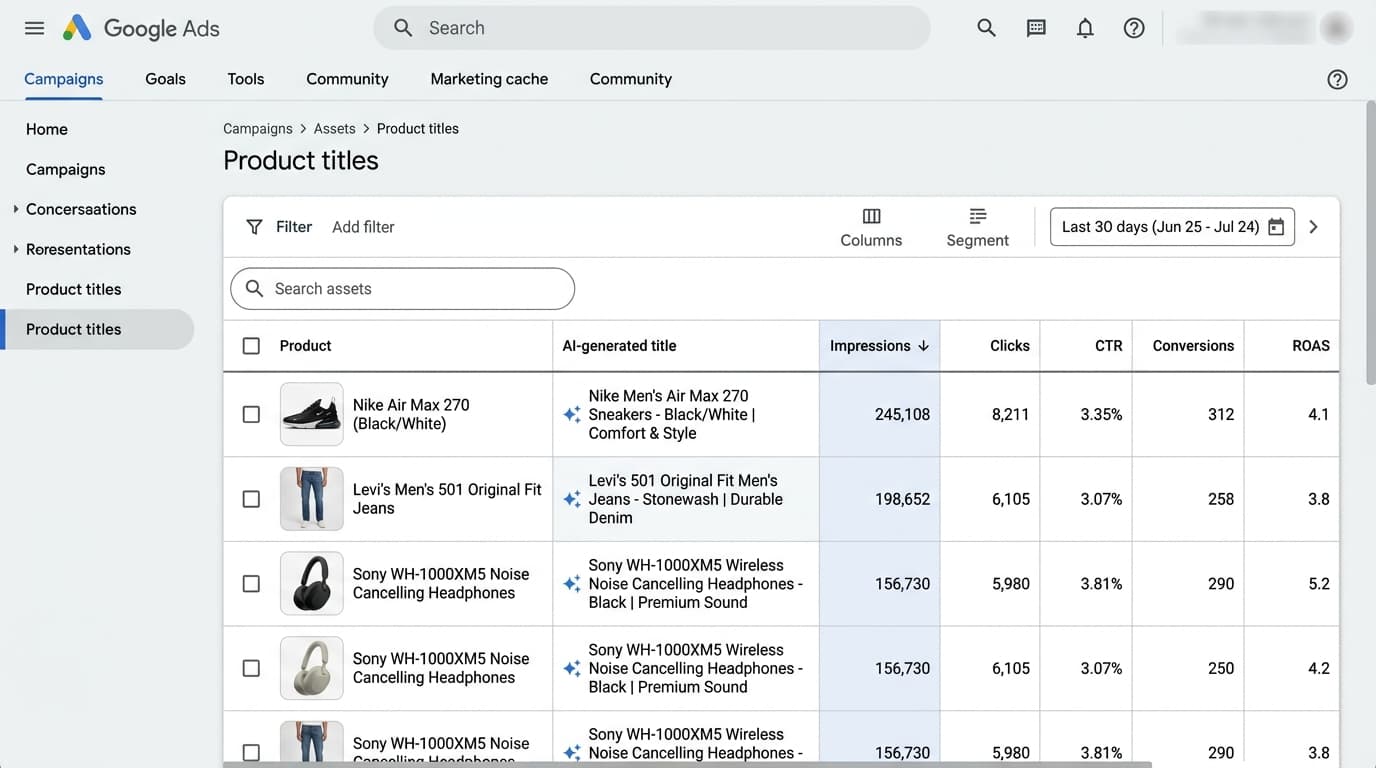
Here is an illustrative layout of how the report presents comparative performance:
| Original Feed Title | AI-Generated Title Served | Impr. | Clicks | CTR | Conv. | ROAS |
|---|---|---|---|---|---|---|
| Trail-X GTX Mens Shoe V2 | Men's Waterproof Trail Boot | 42,100 | 1,420 | 3.37% | 84 | 460% |
| Trail-X GTX Mens Shoe V2 | [Original Title Served] | 18,500 | 410 | 2.21% | 21 | 380% |
| Oak 140cm Dining Table | Solid Oak 6-Seater Table | 12,300 | 390 | 3.17% | 14 | 510% |
| Oak 140cm Dining Table | [Original Title Served] | 15,200 | 310 | 2.03% | 9 | 415% |
My 3-Step Title Audit
When I evaluate this report across client accounts, I do not look solely at blended ROAS. I run a strict three-step audit:
- The Attribute Uplift Ratio: Which specific attributes triggered the largest conversion rate and CTR deltas? If Google repeatedly pulled
"Waterproof"or"Wide Fit"into titles and saw a 30% CTR jump, it tells me my original feed is missing critical attributes that I need to push into my primary feed schema. - Hallucination & Spec Drift: I scan generated titles for factual errors. Did the AI describe a faux leather sofa as
"Genuine Italian Leather"because it scraped a customer review or related blog post? - Brand Equity Erosion: I look for instances where the AI stripped proprietary brand or model terminology to fit generic search queries, diluting brand equity for short-term click volume.

Why a 14-Day Test Is Too Short (The Realistic Testing Protocol)
Google's documentation includes a specific recommendation: "To get the most out of your reporting metrics, you should wait at least 2 weeks after enabling AI Max for Shopping campaigns... before making changes... This ramp up period allows Google Ads to learn and optimise."
Sources & Further Reading
- About AI Max for Shopping campaigns - Google Ads Helphttps://support.google.com/google-ads/answer/16142719
Many practitioners misread this line and conclude that a 14-day test is sufficient to judge the feature. That is a major mistake.
Fourteen days is not an evaluation test; it is merely Google's algorithmic warm-up window. In real ecommerce environments, evaluating AI Max for Shopping in 14 days will lead to false conclusions for three reasons:
- Conversion Lag & Latency: In retail, especially in higher-AOV verticals like furniture, luxury fashion, or consumer tech, the consideration cycle is rarely same-day. Purchases happen 7 to 28 days after the initial click. If you evaluate performance at day 14, you are evaluating an incomplete attribution cohort.
- Day-of-Week & Payday Cycles: A 14-day window captures only two weekend cycles and may entirely miss monthly payday spikes, creating seasonal noise.
- Statistical Confidence at SKU Level: While an account may get thousands of clicks, individual product titles need enough impressions to establish statistical significance against original baselines.
- Days 1 to 14 (Ramp-up): Algorithmic learning period. Zero structural changes. Text Customisation = ON, Final URL Expansion = OFF.
- Days 15 to 30 (Data Collection): Machine stable. Accumulating clean impression and conversion data. First weekly audit of the Product Titles report for hallucinations.
- Days 31 to 45 (Review & Scale): Mature conversion window. Compare AI title ROAS/CPA against baseline. Apply refined Text Guidelines and evaluate Final URL Expansion.
My non-negotiable rule is a 30 to 45 day test: 14 days for the model to warm up, followed by at least 3 to 4 full weeks of clean data collection before making strategic scaling decisions.
Furthermore, you must isolate your variables. When you turn on Text Customisation and Final URL Expansion simultaneously, you introduce two confounding factors: title relevance and landing page type.
If conversion rate drops by 20%, was it because the AI wrote poor titles, or because Final URL Expansion routed high-intent product searches to a generic category page instead of a high-converting PDP? You will have no idea.
Phase 1 Ground Rules:
- Enable Text Customisation only. Leave Final URL expansion unticked.
- Keep budget and tROAS steady. Do not touch targets during the 14-day warm-up window.
The Tri-Fold Guardrail Perimeter
Before flipping the switch on AI Max for Shopping, I install three mandatory operational perimeters:
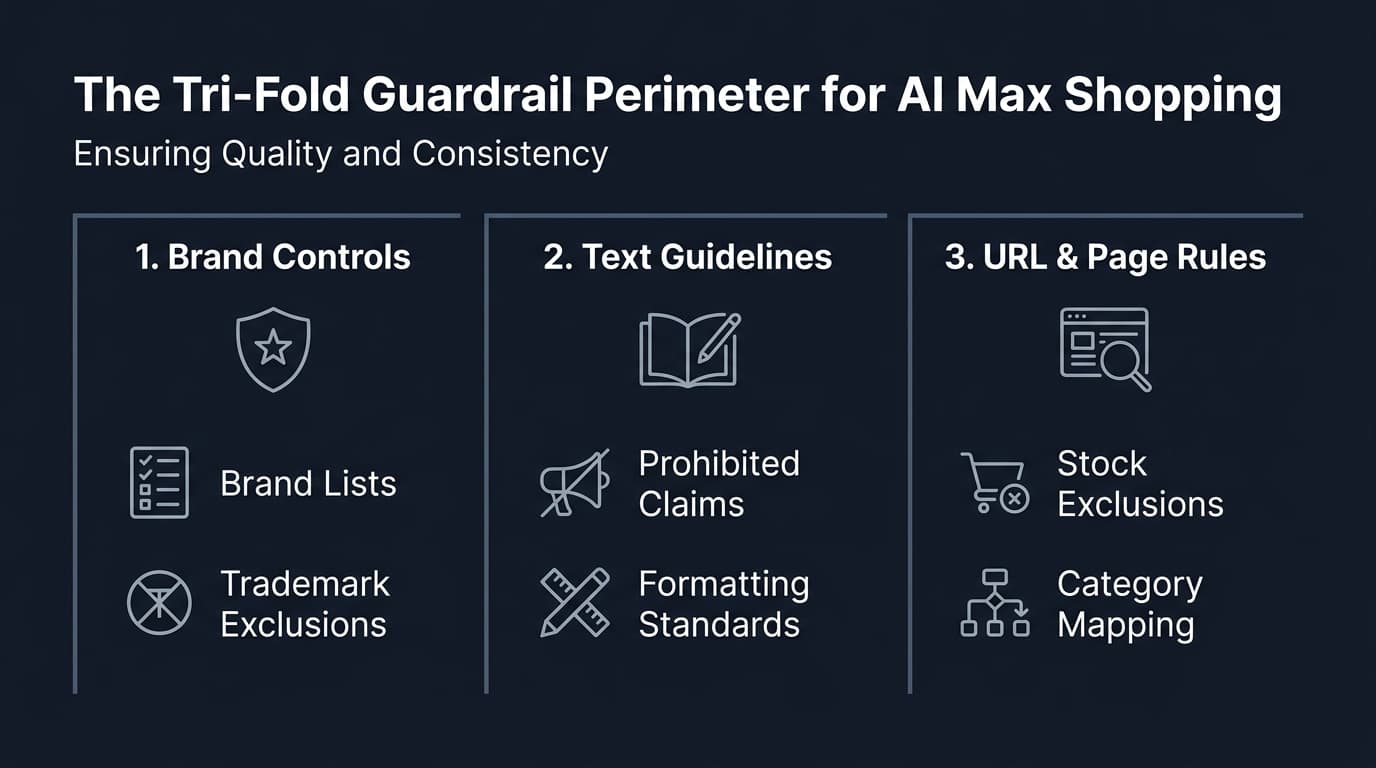
- Brand Controls: Strict Brand Lists and Trademark Exclusions to prevent brand drift and navigational query poaching.
- Text Guidelines: Explicitly prohibited promotional claims, capitalisation rules, and regulatory naming constraints.
- URL & Page Rules: Out-of-stock exclusions, blog/informational page blocking, and structured schema verification.
1. Brand Guidelines & Brand Lists
Google Ads now supports account-level and campaign-level Brand Lists in AI Max and Performance Max.
- Define exact brand identities: Ensure your exact trademarked brand name, parent entity, and sub-brands are registered in your Google Ads Brand Library.
- Apply brand exclusions where necessary: If you run dedicated, high-ROAS Brand Search campaigns, apply Brand Exclusions to your AI Max Shopping campaigns to prevent the automated layer from poaching navigational brand demand.
2. Explicit Text Guidelines
Do not let the generative engine guess your editorial standards. Within campaign settings, input strict text instructions:
- Prohibited claims: Explicitly ban promotional phrases that violate merchant policies (e.g., "Cheapest online", "Guaranteed results", "Official clearance").
- Naming conventions: Require the inclusion of model numbers or technical sub-categories if required for regulatory compliance (e.g., medical devices, automotive parts, electrical components).
- Tone & formatting: Set casing standards (e.g., Title Case vs Sentence Case) to maintain brand polish across all generated formats.
3. Landing Page & Website Readiness
If you eventually progress to Phase 2 and test Final URL Expansion, your website architecture must be bulletproof:
- URL Exclusions: Exclude all informational, career, terms of service, blog, and discontinued collection pages. If Google AI routes Shopping ad spend to a blog post about "How to choose a sofa", your ROAS will collapse.
- Structured Category Hierarchy: Final URL expansion relies on clear page thematic context. Ensure your category and collection pages have accurate
ItemPageandCollectionPageSchema markup, accuraterobots.txtdirectives, and visible stock counts. - Out-of-Stock Handling: Ensure your ecommerce CMS dynamically removes out-of-stock category URLs from internal linking and sitemaps so the crawler does not route mid-funnel queries to empty shelves.
The Strategic Verdict: What This Means for Feed Specialists
The emergence of generative product titles does not make feed optimisation obsolete. In fact, it fundamentally upgrades the feed specialist's role.
In the static era, feed management was largely syntactic: rearranging title strings, truncating characters, and injecting keywords into titles.
In the AI Max era, feed management becomes semantic and structural:
- The Richer the Feed, the Better the AI Title: The generative engine cannot invent attributes it does not have. If your GMC feed lacks
[material],[pattern],[gender],[size_system],[age_group],[short_product_description], and custom attributes, Google's AI has nothing to pull from except surface-level page scraping. Rich feed data is the training data for your auction-time titles. - Auditing Replaces Manual Copywriting: Instead of spending twenty hours drafting static titles across 10,000 SKUs, I spend my time auditing the Product titles report, identifying which attributes drive conversion lift, and refining brand guardrails.
- Closing the Loop Back to Primary Data: When the Product titles report shows that specific generated phrases (e.g., "Extra Cushioning") beat the baseline by 40%, I take that learning and feed it back into on-page SEO, product descriptions, and primary feed attributes.
AI Max for Shopping is not a set-and-forget toggle. It is an active bidding and creative layer that requires deliberate containment.
Turn Text Customisation on. Keep Final URL Expansion off. Build your perimeter first, give the test a realistic 30 to 45 day window to mature, and use the new Product titles report to verify that automation is working for your bottom line, not just Google's inventory.
Action Checklist for Practitioners
- [ ] Navigate to Google Ads and check beta availability under
Campaign Settings -> AI Max for Shopping. - [ ] Ensure Brand Lists are populated in your Shared Library before enabling any automated text features.
- [ ] Activate Text Customisation while keeping Final URL Expansion unchecked.
- [ ] Define Text Guidelines in campaign settings to prohibit unverified claims, incorrect formatting, or unauthorised brand variations.
- [ ] Establish a 30 to 45 day testing calendar; allow the first 14 days purely for algorithmic learning with zero bid or budget disruptions.
- [ ] Schedule a recurring weekly audit of the
Campaigns -> Assets -> Product Titles Reportto compare AI-generated title performance against your original feed baseline. - [ ] Backport winning title attributes from the report into your primary Google Merchant Centre feed schema.