What to Do While You Wait: Account Work That Does Not Reset Learning
When the right move is to wait on bids and targets, there is still useful account work: search term, placements, measurement checks, and post-click review that clean waste without resetting Smart Bidding.

 Ana Kostic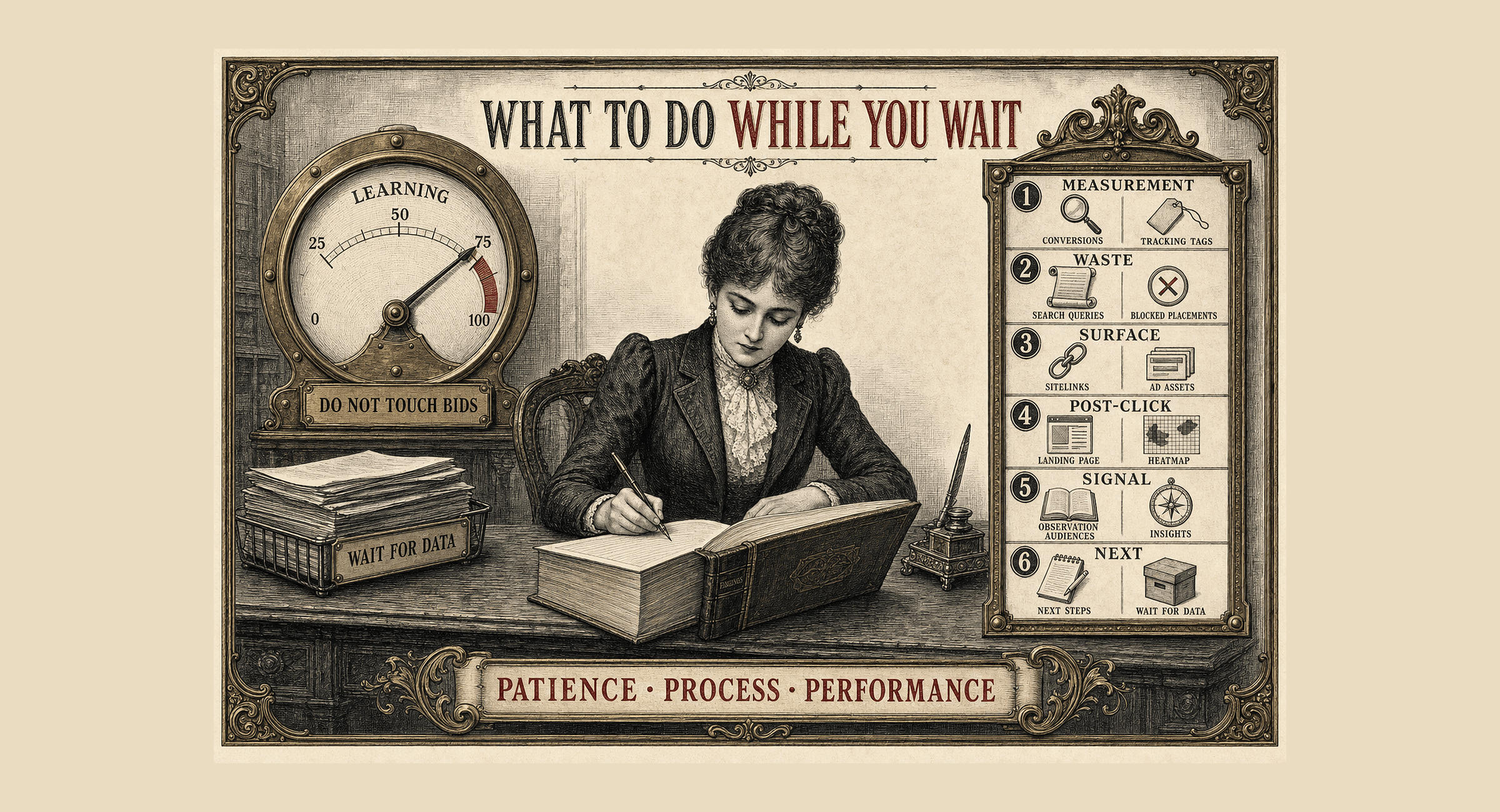
In the companion piece I wrote earlier this month, The Hardest Optimisation Is Doing Nothing, on account discipline, the argument is simple: most bad decisions come from touching campaigns when the right move was to wait.
That leaves a practical question. If you are not changing bids, targets, budgets, or strategy, what are you actually doing?
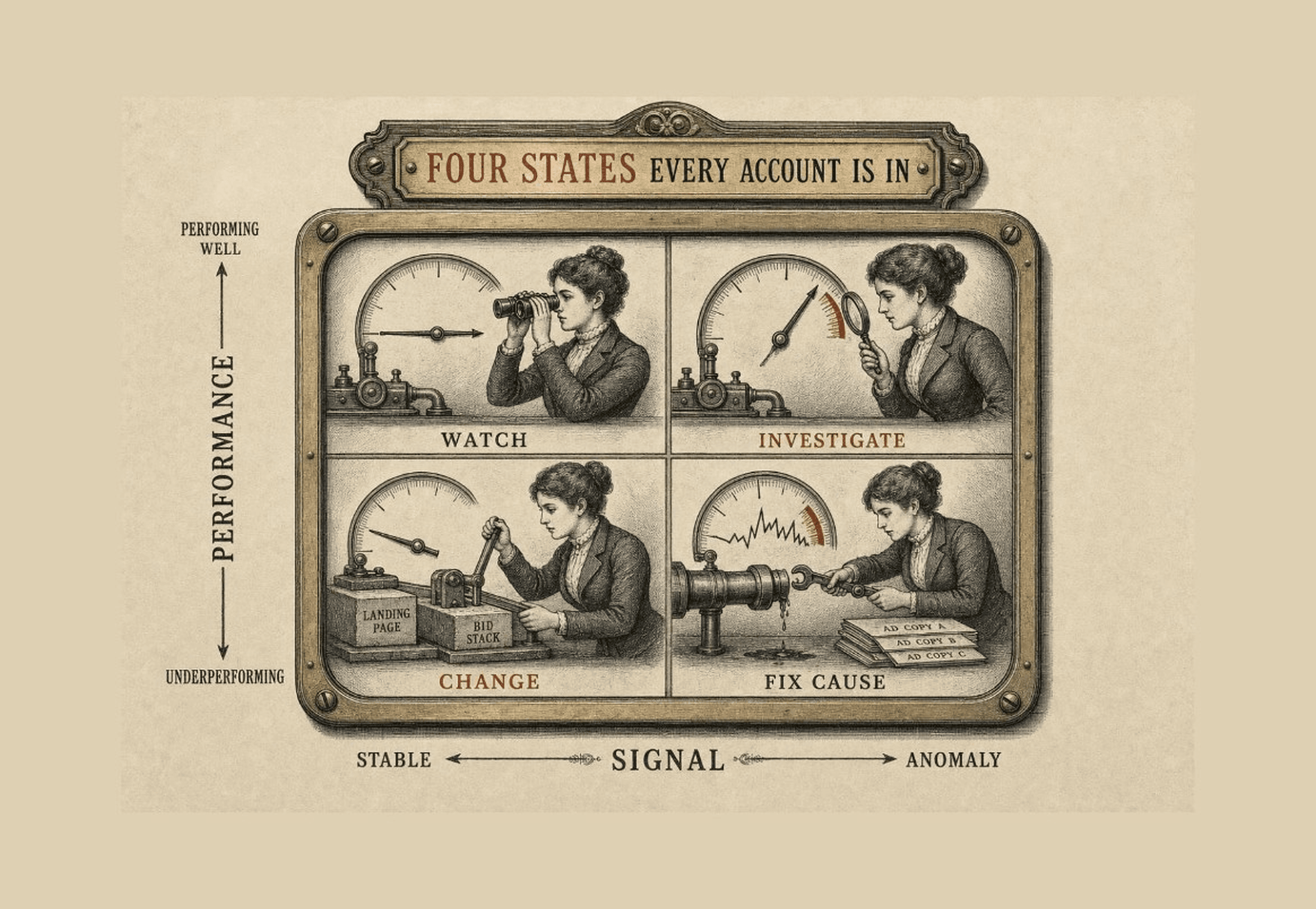
This guide is for those periods: a new Target CPA or Target ROAS campaign still in learning, an account in state 1 (performing well and stable), or state 3 (underperforming with something anomalous worth investigating before you reset bids). The framework for those four states is in part one. This is the practical list for the waiting period.
What I deliberately do not do while waiting
Do not do:
- Change tCPA or tROAS because CPA spiked for three days.
- Switch bid strategy "just to test something".
- Launch three new ad groups and a PMax asset group refresh on the same afternoon.
- Rewrite all RSAs because Ad Strength is "Average".
If it resets learning or changes the instruction to the algorithm, it waits. If it cleans, verifies, or prepares, it belongs on this list.
Search terms: always first
Reviewing search terms does not change bid strategy. It cleans waste.
Negative out what should not be there. Spot patterns that keep returning. Occasionally find queries worth their own ad group later, when you have data to support the split.
In Shopping or Performance Max, extend this to product titles and how they match demand. Sometimes the problem is not the campaign settings. It's the feed.
Placements: the black hole worth opening
In Display, Performance Max, and some Demand Gen setups, placements are easy to ignore. You should not.
Exclude sites and apps that add impressions without value: junk content, irrelevant games, placements with spend and no conversions.
Excluding placements does not destabilise bidding. It only changes where you appear.
Verify measurement before you interpret CPA
This is when misconfigured tracking shows up as "bad performance."
Check:
- Primary vs secondary conversion actions.
- Duplicate counting (form + thank-you page, etc.).
- CRM or offline import delays.
- Consent / tag firing on the landing page.
If the numbers are wrong, no amount of bid discipline will help.
Assets and extensions: low-risk maintenance
Sitelinks, callouts, snippets, images. Often set up on day one and never reviewed.
I check:
- Assets with zero or very low impressions.
- Broken links or links to out-of-stock pages.
- Search campaigns missing image assets where eligible.
- RSA variety: are headlines genuinely different or the same angle repeated?
Improving assets can shift Expected CTR and Ad Relevance without a bid change. Do not expect miracles in 48 hours, but this is legitimate waiting-period work.
Quality Score as a map
Filter keywords with Quality Score 1 to 4, sorted by impression volume.
Start with Ad Relevance Below Average: adjust copy to reflect the query intent. That is often the fastest copy fix.
Do not rebuild the account because QS is low. Use it to prioritise what to prepare for later tests.
Observation audiences and Insights
If audiences run in observation mode, review them. They show which segments convert above or below average without you having applied a bid modifier.
Use the Insights tab: audience, asset, location. Most managers skip it. It is free and already in the account.
Auction Insights is worth a look too. Not to obsess over competitors, but to understand the auction you are buying into while learning is still running.

Customer Match and CRM lists
When did you last refresh customer lists?
If it has been more than 30 to 60 days, you may be feeding stale signal into campaigns that use Customer Match or similar audiences.
Build differentiated segments where volume allows: all customers, high-LTV, repeat buyers. A mixed list is not the same as clean behavioural segments.
Updating lists is maintenance.
Landing pages and post-click experience
Install Microsoft Clarity (or your preferred session tool) if you do not have one. Heatmaps and recordings show drop-offs no Ads report will explain.
Check message match: if the ad promises a specific offer, the landing should lead with that offer, not a generic brand hero.
Map the funnel: click, landing, scroll, form start, submit. Campaigns can look "fine" in-platform while bleeding after the click.
Gap and competitive research (off-account work)
While the campaign runs, research what you might do when data supports a structural change:
- Keywords or categories with no dedicated coverage.
- Long-tail terms converting elsewhere that deserve their own group later.
- SERP audit on top 20 terms: who appears, what angles they use.
- Ads Transparency Center / Meta Ad Library for competitor creative patterns.
This does not touch the live campaign. It prepares the first justified optimisation when volume and time support a real decision.
Creative review without launching everything
For PMax, Demand Gen, and social ads-heavy setups, review asset-level performance where available.
Note which formats, angles, and messages lead on CTR or conversions. Sketch tests. Do not launch them all at once.
Having a test plan ready is real work, even if you never press activate during the waiting period.
How I structure the review
| Focus | What to do |
|---|---|
| Measurement | Tracking sanity check: primary actions, duplicates, import lag |
| Waste | Search terms (Search / Shopping) + placement exclusions |
| Surface | Asset and extension review |
| Post-click | Landing page + Clarity or equivalent |
| Signal | Observation audiences + Insights + Auction Insights |
| Next | Document findings; list what waits for enough data |
Nothing here replaces the conversion volume and time thresholds you need before a bid or target change. Everything here makes that later decision sharper.
Frequently Asked Questions
- Should I add negative keywords aggressively while a campaign is still learning?
- Yes, for cleaning waste. No, for borderline queries you have not seen enough times to judge. Remove obvious junk; flag maybes for when you have more data.
- Can I add new ad copy while waiting?
- Adding RSAs or assets is lower risk than changing tCPA, but it still adds variables. I limit it to clear gaps (broken assets, missing formats), not a full creative refresh.
- What if CPA is double the target after ten days?
- Investigate tracking, search terms, and landing pages first.
In summary
Waiting is not "do nothing." It is do nothing that resets learning.
Clean search terms and placements. Verify conversions and post-click experience. Maintain assets and lists. Read observation data. Research what you will test when the numbers mean something.
Part one is the discipline: know which of the four account states you are in and when not to touch. Part two is the practice: the account work that keeps you useful without undoing the learning you are trying to protect.