How Postcode Bidding Increased Local Inventory Ad Impressions by 300% and Local Sales by 40%
You’ll learn how to move beyond basic radius targeting and use postcode-level data to scale Local Inventory Ads in the areas that matter most. The article gives you a practical framework for increasing local visibility, store visits and sales.



This article is for retailers and brands with physical shops that want to increase store visits and in-store sales while protecting and growing online revenue. The aim is not to choose between local and online performance, but to create a campaign structure that supports both.
Local Inventory Ads should be one of the strongest tools available to a retailer. They can show nearby shoppers that the product they want is available in a physical store, at the moment they are searching for it.
But many advertisers struggle to scale them.
The assumption is often that the ad format itself is the limitation. In our experience it is usually the campaign structure and the geography behind it.
When Local Inventory Ads sit inside broad national activity, local demand can become blurred. Google decides when those ads appear, while the advertiser has limited control over which store catchments deserve the most attention.
So we built a postcode bidding framework.
It combines postcode geography with real driving distance and drive time to identify which postcodes fall within a realistic store catchment. We then use those catchments to separate local and national activity, giving Local Inventory Ads a cleaner local context in which to work.
That helps local products appear more effectively around the stores that can actually serve the customer. The journey becomes simpler: search for a product, see that it is available nearby, visit the store and buy.
The postcode tool is the framework. Scaling Local Inventory Ads is one of the commercial results it delivers.
Why we built a postcode bidding tool
The original problem went wider than targeting. It was the connection between measurement, structure and activation.
Most omnichannel accounts are still judged mainly on what happens on the website. Google Ads sees an online order clearly. The revenue is captured, the conversion is attributed and Smart Bidding receives a strong value signal.
The store journey is less obvious.
A customer might click a Shopping ad, check whether a product is available nearby, look at opening hours, request directions and buy in store later that day. If that value never makes it back into Google Ads, the website purchase appears more important simply because it is easier to observe.
That creates three problems:
-
Budget moves away from campaigns that help drive store demand.
-
Local successes are averaged into wider national performance.
-
Bidding favours online purchases because they carry the strongest visible value.
Once we started widening the measurement model to include store visits and other local outcomes, two more problems became obvious.
First, the usual radius-based setup gave us very little control over where local demand actually came from.
Second, Local Inventory Ads were sitting within a structure that was not designed to prioritise the strongest store catchments. We had the product availability, but not a precise enough local framework for activating it.
That is what the tool was designed to solve.
Why radius targeting was not good enough
Radius targeting assumes that distance from a store is the best proxy for local intent.
Sometimes it is. Often it is not.
Imagine two postcodes:
-
Postcode A is six miles from the store but sits across a congested city centre.
-
Postcode B is nine miles away but connects to the store through a fast main road.
A conventional radius treats Postcode A as the stronger local opportunity. A customer may find Postcode B much easier.
The same issue appears around rivers, railway lines, bridges, retail parks and commuter routes. A radius creates a clean shape for the advertiser, but it does not model the customer's journey.
The better question is not, "How many miles around the store should we target?"
It is, "Which postcodes are genuinely accessible, commercially viable and worth investing in?"

What the postcode bidding tool actually does
The tool connects four types of information that are usually reviewed separately.
1. Store and postcode geography
We begin with the store location and build a broad universe of surrounding postcodes.
The starting list is deliberately wider than the area we expect to target. Filtering too early would allow our assumptions to decide which postcodes deserve attention before the data has a chance to do it.
2. Real driving distance
The tool connects with the Google Maps API and calculates the actual driving distance between each postcode and the store.
This immediately improves on a straight-line radius because it respects the real road network.
3. Expected drive time
Distance alone is still incomplete. Ten miles on a clear A-road is very different from ten miles through slow city traffic.
Drive time gives us a more realistic view of accessibility. It also makes it easier to identify postcodes that appear close on a map but are inconvenient in practice.
4. The drive-time sweet spot
We do not overlay Google Ads outcomes at postcode level. Instead, we use overall campaign performance to optimise the drive-time threshold over time. Around 30 minutes is often a strong starting point, but the sweet spot varies by business.
Depending on the account, that performance can include:
-
Store visits
-
Store visit value
-
Store sales, where the account is eligible
-
Local actions such as direction requests
This is the point where the threshold becomes an optimisation decision rather than a fixed assumption.
Geography tells us where the postcode is and drive time tells us whether the store is convenient to reach. Overall campaign performance helps us refine how far that catchment should extend.
The postcode workflow
The method has six practical steps.
Step 1: Build the postcode universe
Start with every postcode that could reasonably belong to the store's wider catchment.
Do not begin with a tiny radius or a list based only on the team's assumptions. The purpose of the first step is coverage.
Step 2: Calculate distance and drive time
Run each postcode through the mapping layer and record:
-
Actual driving distance
-
Expected drive time
-
The most practical route to the store
This creates the accessibility layer.
Step 3: Apply a realistic travel threshold
Remove or deprioritise postcodes that are technically nearby but unrealistic for the customer.
The threshold needs to reflect the business. A 40-minute journey might be unacceptable for a routine purchase but completely normal for a specialist retailer or a high-value product.
Do not turn one drive-time limit into a universal rule. Treat it as a hypothesis and test it against performance.
Step 4: Activate the local geography
Use the cleaned postcode list to define the geography of the local campaign.
The wider national campaign can exclude the postcodes assigned to local activity. This prevents the two campaigns from competing for the same geography and gives each one a clearer job.
The local campaign can then use its own budget, conversion goals, inventory setup and reporting view.
This is also where the postcode framework begins to amplify Local Inventory Ads. The product feed is no longer relying on one broad national structure to serve both eCommerce demand and store-led demand. Local products have a campaign context built around the postcodes most likely to reach the store.
Step 5: Optimise the drive-time threshold
Once enough data has accumulated, review overall campaign performance as the drive-time threshold is tested and refined.
Ask:
-
Does the current threshold generate efficient store visits?
-
Is blended online and offline value strong enough at the current threshold?
-
Does extending the catchment create enough additional commercial value?
-
Would a tighter catchment improve efficiency without sacrificing too much volume?
-
Is the starting threshold still right for this business?
This is how we find the drive-time sweet spot without overlaying performance at postcode level.
Step 6: Build and update the postcode catchment
The selected drive-time threshold determines which postcodes are included in the local catchment and which are ignored.
That catchment can guide:
-
Which postcodes remain in the local campaign
-
Which areas are excluded from national activity
-
Where budget should be concentrated
-
Where conversion values or bidding expectations need reviewing
-
Whether the drive-time threshold needs more testing before a decision is made
The tool works best when it is run again and again. Treat it as an ongoing review of local demand rather than a postcode list you produce once.
Why Local Inventory Ads matter so much
For retailers, Local Inventory Ads connect nearby searches with products that are available in physical stores.
Google describes them as a way to show product and store information to local shoppers at the moment they search. They can also show options such as pickup today or pickup later. See Google's Local Inventory Ads overview.
This is what Local Inventory Ads look like in practice. The location labels beneath the product cards make the local element visible to the shopper.
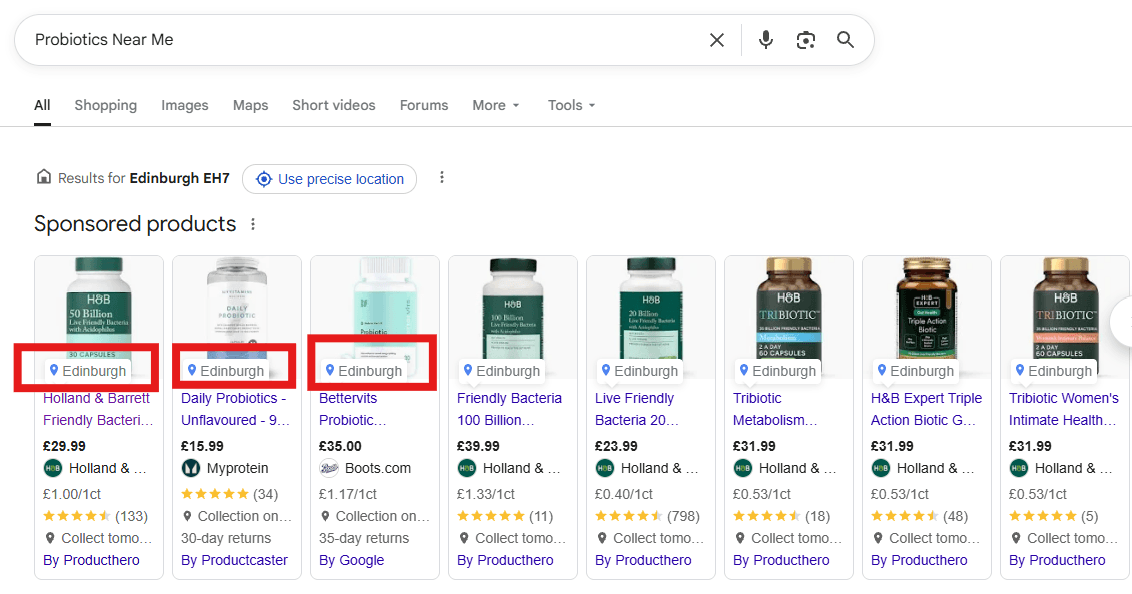
Local Inventory Ads do more than add another Shopping format to the account. They are the point at which the postcode framework reaches the customer.
The framework identifies the catchment and the local campaign creates the right environment for it. Local Inventory Ads then show nearby shoppers what is actually available in store.
That can shorten the journey between intent and purchase:
-
A customer searches for a product.
-
The ad shows that the product is available at a nearby store.
-
The customer can check availability, opening hours, directions or pickup options.
-
The customer visits the store or completes the most convenient purchase journey.

The postcode framework improves geographic control on its own. Add Local Inventory Ads and it also improves what happens between a local product search and a sale.
The bonus: how to scale Local Inventory Ads
Many advertisers assume Local Inventory Ads are difficult to scale because Google controls when they appear and their practical reach can feel wider than the areas the retailer wants to prioritise.
The postcode framework gives us a more practical way to influence that environment.
1. Separate local and national activity
The national campaign continues to focus on broader eCommerce demand across the rest of the country. The local postcodes are excluded from that campaign and placed into local activity with a clearer store-led purpose.
None of this forces Google to show a Local Inventory Ad, but it does give Google a much cleaner signal about where the local product feed and store-related outcomes matter most.
2. Build local campaigns around real catchments
Use the postcode and drive-time model to define the areas that can realistically reach each store. Do not rely on one standard radius for every location.
This means the campaign is built around accessibility and observed value, rather than a circle on a map.
3. Strengthen the local retail foundation
The feed still needs accurate store codes, prices and availability. The Business Profile and Merchant Center setup also need to be linked correctly.
Verified locations, accurate opening hours and properly connected location assets support the same journey. If any of those details are wrong, better postcode targeting cannot rescue the customer experience.

4. Keep the campaign commercially complete
Our preferred setup is not a separate Performance Max campaign for store goals. We use the local and national split, Local Inventory Ads, location assets and strong feeds within a normal Performance Max structure that can optimise towards online sales and store-related value.
That matters because the customer still has two possible journeys. The campaign should not be forced to choose between eCommerce and the store when the same local shopper may use both.
5. Feed store value back into bidding
Local visibility is only useful if it contributes to commercial value.
Store visits, estimated store visit value and store sales, where eligible, help Google understand that an ad can create value after the click even when the website does not record the final transaction.
This gives the local campaign a better chance of optimising for the complete customer journey rather than the easiest conversion to observe.
6. Review visibility, visits and sales together
Do not judge the structure only by the number of Local Inventory Ads served.
Review whether the additional visibility is appearing in the intended postcode catchments and whether it is contributing to stronger store visits, blended return and sales. That is how you separate useful scale from extra impressions.
What happened after the structure split
Before the restructure, local product demand was being blended into broader national activity. We separated the local and national campaigns, excluded the priority store catchments from national activity, and gave the local campaign its own geography, budget, product feed and store-related conversion signals.
That did not force Google to serve more Local Inventory Ads. It reduced the overlap that had been diluting local demand and gave Google a clearer environment in which which to prioritise products available near each store.
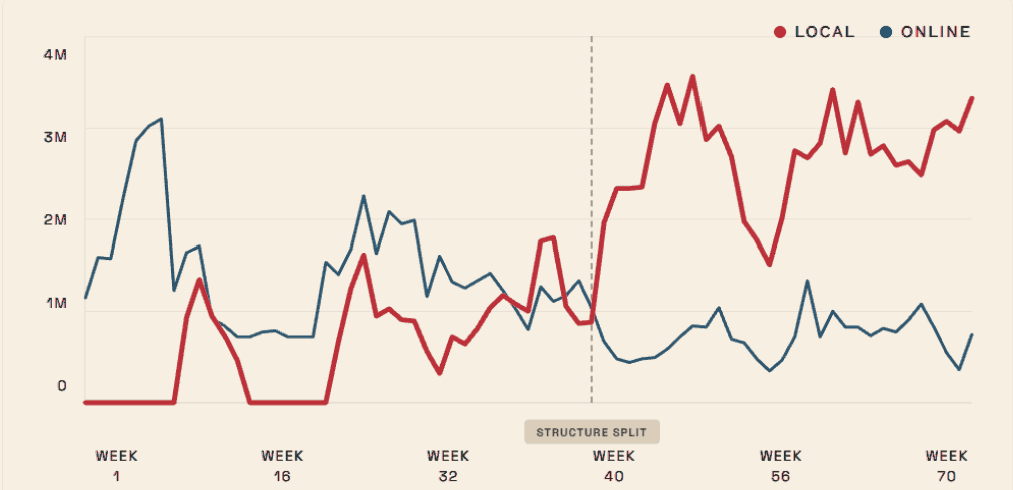
This is what sits behind the spike. The postcode tool identified the right catchments, while the local campaign structure, product feed, location assets and store-related value signals helped Google serve and optimise Local Inventory Ads within them.
The increase in Local Inventory Ad impressions contributed to an approximately 40% increase in local sales. That result came from the complete system working together, not from the postcode list alone.
The tool does not replace Smart Bidding
The phrase "postcode bidding tool" can create the wrong impression.
The aim is to give the campaign a more commercially useful geography and better outcome data, not to apply an arbitrary bid adjustment to every postcode near a store.
Google's Smart Bidding for store visits or store sales already uses signals such as location, device, query and time. Our job is not to recreate that auction-time logic manually.
Our job is to decide:
-
Which local areas belong in the campaign
-
Which outcomes the campaign should value
-
How local and national demand should be separated
-
Whether the value supplied to Google reflects the wider business
The tool creates the structure in which bidding and Local Inventory Ads can make better decisions.
The measurement layer still matters
A postcode can be accessible and the local campaign can still be commercially weak. That is why the drive-time threshold needs to be tested against the campaign's overall outcomes.
Google describes the broader approach as omnichannel bidding. It combines online goals with offline outcomes such as calls, direction requests, store visits and store sales.
Local actions measure engagements such as calls or requests for directions. They are available more widely and can provide a useful starting signal.
Store visits are modelled conversions. Eligible accounts need active location assets, verified locations, enough ad activity and enough store traffic to pass Google's privacy thresholds.
Store sales can provide stronger commercial evidence, but Google requires accounts to be allowlisted and applies significant volume and policy requirements. Check the current store sales eligibility criteria before relying on it.
Use the strongest signal the account can support. Do not pretend a direction request, a modelled store visit and a completed in-store sale carry the same certainty.
Put a sensible value on store visits
If the local campaign is meant to create both website purchases and store demand, both journeys need a value.
Otherwise, Google will naturally favour the online order because it is the only journey carrying clear revenue.
A practical starting point is:
Store visit value = average in-store conversion rate x average in-store order value
For example, if 20% of store visitors buy and the average order value is £80, the estimated value of one store visit is £16.
It is not a perfect number.
It is still far better than valuing store intent at zero.
Google recommends this calculation as a common starting point for Shopping campaigns. It also advises advertisers to revisit return on ad spend targets when conversion goals or values change. See Google's guidance on conversion goals in Shopping campaigns.
One limitation matters: Google says campaigns should not bid towards store visits and store sales at the same time. Choose the offline goal that represents the strongest value your account can support.
Make the tool part of the operating rhythm
Repetition is what makes the tool useful. One attractive postcode map does very little on its own.
Weekly
-
Review local campaign performance and local action trends.
-
Review Local Inventory Ad visibility within the intended catchments.
-
Check whether inventory, promotions or opening hours have shifted local demand.
-
Investigate sudden changes in store visit reporting.
Monthly
-
Revisit the drive-time threshold and resulting postcode catchment.
-
Compare cost growth with blended value.
-
Test whether the catchment should be widened or tightened.
-
Compare Local Inventory Ad scale with store visits, blended value and sales.
-
Review whether the store visit value remains realistic.
Quarterly
-
Refresh postcode and drive-time calculations.
-
Account for store openings, closures and road-network changes.
-
Reassess the local and national campaign split.
-
Check whether a stronger offline outcome has become available.
The advantage sits with the team that keeps refining the drive-time threshold against overall commercial performance, rather than with whoever draws the neatest radius.
What to do on Monday morning
You do not need to build the complete tool before testing the idea.
Start with one or two stores:
-
Check whether Local Inventory Ads are enabled and whether the local product feed is accurate.
-
Export the postcodes currently treated as local.
-
Compare straight-line distance with actual drive time.
-
Identify the postcodes your current radius is overvaluing or missing.
-
Choose an initial drive-time threshold and include only the postcodes that fall within it.
-
Decide whether a local and national split would give Local Inventory Ads a clearer environment in which to scale.
Radius targeting tells you who is nearby.
The postcode bidding framework helps you understand who can realistically reach the store. Local Inventory Ads turn that understanding into a more relevant product journey.
Between them they connect search, product availability, store visits and sales into one local growth model.
Want access to the postcode bidding tool?
If you would like access to the tool, email me at teo@byltmedia.com or connect with me on LinkedIn.
Frequently asked questions
Frequently Asked Questions
- What is a Google Ads postcode bidding tool?
- It is a postcode-level workflow that combines store geography with real driving distance and drive time. The output identifies postcodes within a chosen drive-time threshold and helps advertisers shape local campaign targeting, exclusions, budgets and bidding inputs.
- Does the tool automatically change bids by postcode?
- No. The tool does not change bids automatically. It identifies the postcodes that belong within the local catchment and guides how we structure the campaigns. We remain in control of the geography and tell the bid strategy where to focus, while Smart Bidding optimises within that structure.
- Why is drive time better than a radius?
- Drive time reflects the journey a customer would actually make. A radius measures proximity but ignores roads, traffic, bridges, public transport and other accessibility barriers.
- Do I need store visit reporting to use the framework?
- Yes. Store visit reporting is required because the framework is built around omnichannel bidding. It provides the offline signal needed for the local campaign to optimise towards in-store outcomes, rather than only online sales. Without that signal, the system cannot measure or optimise the local journey as intended.
Frequently Asked Questions
- Do local and national campaigns need to be split for this framework to work?
- Yes. The split is fundamental to the framework. The selected local postcodes need to sit in dedicated local activity and be excluded from the national campaign. That gives Local Inventory Ads their own geography, budget and store-related conversion signals, allowing the bid strategy to focus on local demand. Without the split, local and national demand remain blended and the framework cannot work as intended.
- How does the postcode framework help scale Local Inventory Ads?
- It identifies the postcodes that can realistically reach the store and places them into a clearer local campaign context. That gives Google a stronger environment for prioritising the local product feed around relevant shoppers, while store visits and sales help show whether the additional visibility is commercially useful.
- Should I use Performance Max for store goals?
- Not as a separate Performance Max campaign for store goals. Our preferred setup is a normal Performance Max structure split into local and national campaigns, with strong feeds, Local Inventory Ads, location assets, online sales and store-related value working together.
Sources & Further Reading
- About omnichannel bidding, Google Ads Helphttps://support.google.com/google-ads/answer/17164808?hl=en
- About store visit conversions, Google Ads Helphttps://support.google.com/google-ads/answer/6100636?hl=en
- About location assets, Google Ads Helphttps://support.google.com/google-ads/answer/2404182?hl=en
- About local actions conversions, Google Ads Helphttps://support.google.com/google-ads/answer/9013908?hl=en
- About store sales availability and eligibility, Google Ads Helphttps://support.google.com/google-ads/answer/15885010?hl=en
- About conversion goals in Shopping campaigns, Google Ads Helphttps://support.google.com/google-ads/answer/9546836?hl=en
- Use the right tools, Google Ads Helphttps://support.google.com/google-ads/answer/6190165?hl=en
- Local Inventory Ads and free local listings overview, Google Merchant Center Helphttps://support.google.com/merchants/answer/14615117?hl=en