The Best Self-Made Automation Tool I've Built
The tool that saved me around 90-180 of manual hours & helps improve overall relevance performance on the account.

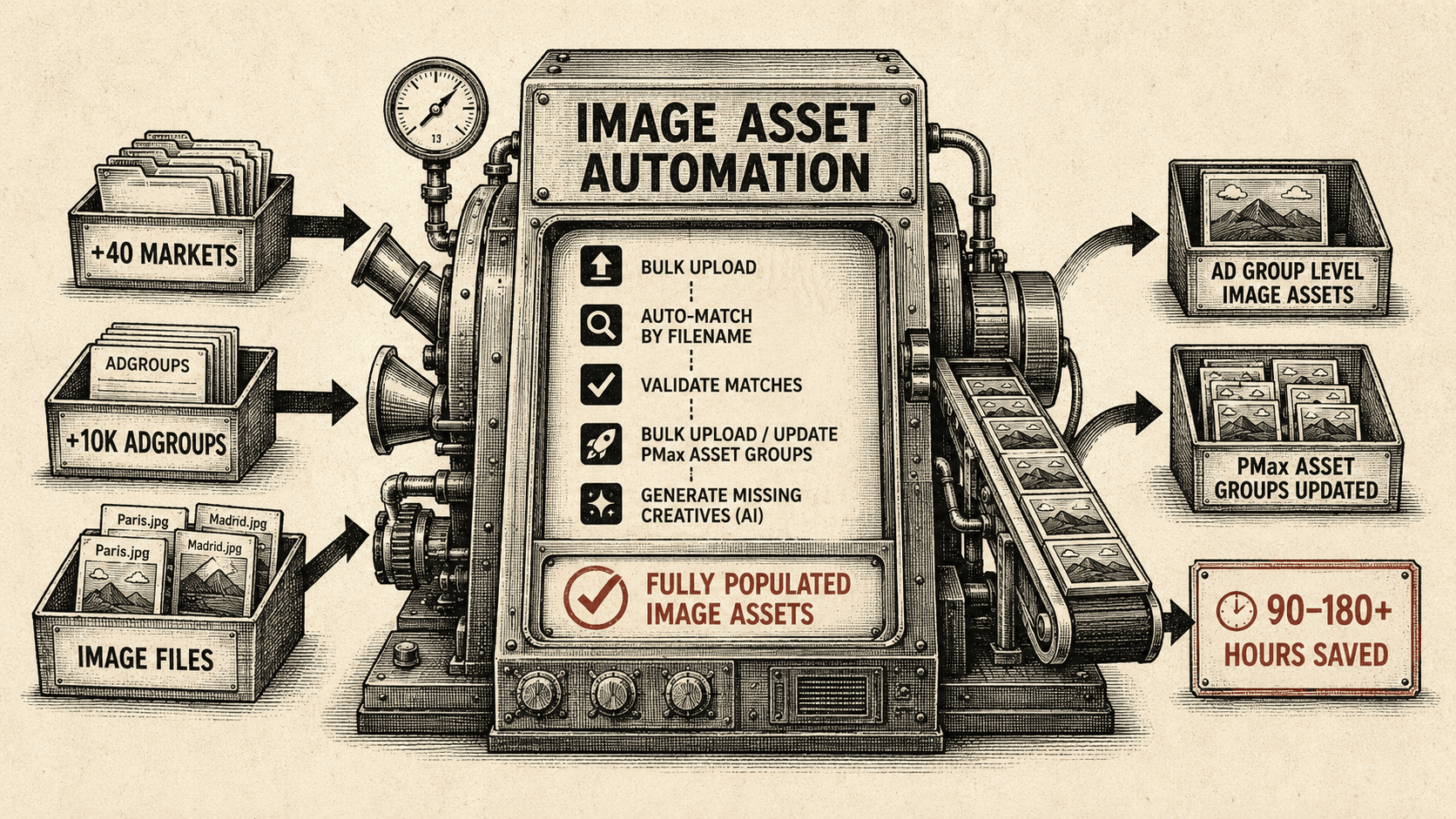
The Problem: 10,000+ Ad Groups and 90–180 Hours of Manual Work
Managing image assets across 40+ markets and 10,000+ ad groups is repetitive, slow and could lead to some errors.
At this scale, something as simple as making sure every relevant ad group has the correct image assets can turn into a huge manual task, specially depending on what industry you work at (travel in this case).
You potentially need to go account by account, identify missing assets, find the correct images, match them to the right ad groups and then upload everything.
Depending on the account structure and the amount of work required, this could easily represent 90, 180+ hours of manual work.
And the problem isn't only the time spent. When image assets aren't properly managed, accounts can end up with incomplete creative coverage.
I refused to do this manually!
The Solution: Automated Matching and Bulk Uploads
Here is the workflow we built to solve this:
- Bulk upload image assets at ad group level
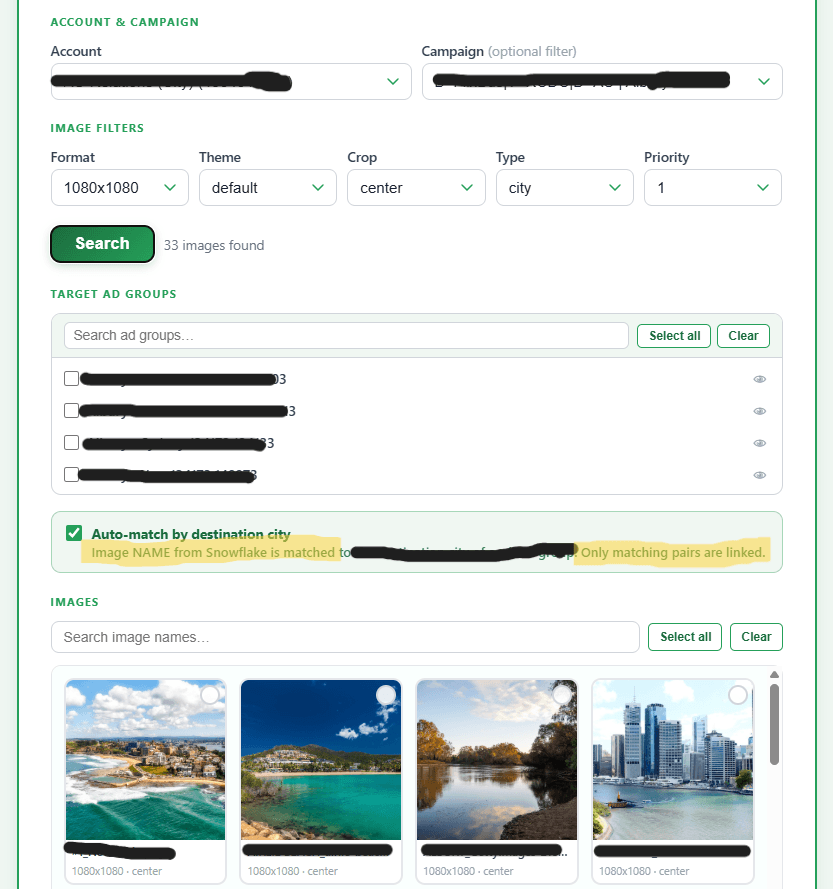
- Automatically match images to ad groups using filenames (city-names)
- Validate matches before anything is uploaded
- Bulk upload and update Performance Max Asset Groups
- Identify ad groups that are missing relevant image assets
- Generate missing creatives using AI image generation based on campaign and ad group names and predefined prompts
Connecting Claude Code, Snowflake, and Google Ads API
It all starts on Claude + VS Code and a simple prompt: I need to build (insert any tool name you want to build), please help me do it.
Claude will then ask you to start different connections, in my personal case it was with Snowflake database (can be any database). This contains all images available for any product.
From there, the relevant data is pulled into the automation tool through Claude Code in VS Code, which acts as the layer connecting the data and the logic of the tool. The tool then uses the Google Ads API to identify the relevant campaigns and ad groups and prepare the assets for upload.
The Core Mechanic: Filename-to-Ad-Group Matching
The most important part of the process is the matching.
In our setup, each ad group has a unique ID, and that ID is also incorporated into the image naming convention. This means the tool can use the ad group ID to determine which image belongs to which ad group.
The filename matching is particularly useful at scale. Instead of manually selecting which image belongs to which ad group, the tool can use naming conventions to identify the most relevant match.
If your naming conventions are inconsistent or your identifiers aren't reliable, the matching process becomes much more complicated.

For example, if an ad group and an image share the same or a similar naming structure, the tool can automatically associate them and flag the match for validation before uploading. If these don't match, then no images will be uploaded.

This turns what would normally be a long manual process into something much closer to a controlled, automated workflow.
What to Take Away: Time Savings & CTR Uplift
Since implementing this tool, the process of uploading and managing image assets has become significantly better, from the around 90-180h to just selecting the accounts & hitting upload.
From a performance perspective, we also observed a 1–3% month-on-month CTR uplift across approximately five accounts/markets where the automation was applied.
While the exact impact varies, the direction is clear: better asset coverage leads to better execution, and better execution leads to better performance.
The Prompt to Build It Yourself
Here is the exact prompt and specification to create something similar:
Build a local web dashboard to bulk-upload images as Google Ads assets
Create a local web tool (FastAPI backend + vanilla JS frontend) that connects to a Google Ads MCC account and a Snowflake data warehouse to bulk-upload image assets to ad groups and Performance Max asset groups.
What it needs:
- Google Ads API credentials (developer token, OAuth2 client ID/secret, refresh token) and a
google-ads.yamlconfig file - Snowflake (or any other database) connection for pulling account/campaign/ad group hierarchy and an image catalog view (account, snowflake credentials with SSO or user/password auth)
- A Python virtual environment with
fastapi,uvicorn,google-ads,snowflake-connector-python,Pillow, andhttpx
Core features to implement:
- Account → Campaign → Ad Group selector (from Snowflake, enabled only)
- Drag-and-drop multi-image upload with optional cropping
- Image-name auto-matching between image filenames and ad group names (accent-normalized, whole-word token logic)
- Deduplication via MD5 hash in asset name to avoid re-uploading identical images
- Real-time upload progress log via SSE streaming
- Image library tab filtered by product/account
- Performance Max asset group upload tab
- Snowflake session keepalive + status indicator in the UI
Stack: Python 3.11+, FastAPI, google-ads Python client library (v18+), snowflake-connector-python, vanilla JS (no framework needed), served as a single index.html static file.